
Production Patterns for AI Chatbots: A Data Scientist's Guide
What happens when your bot meets real users—and how to prepare for it

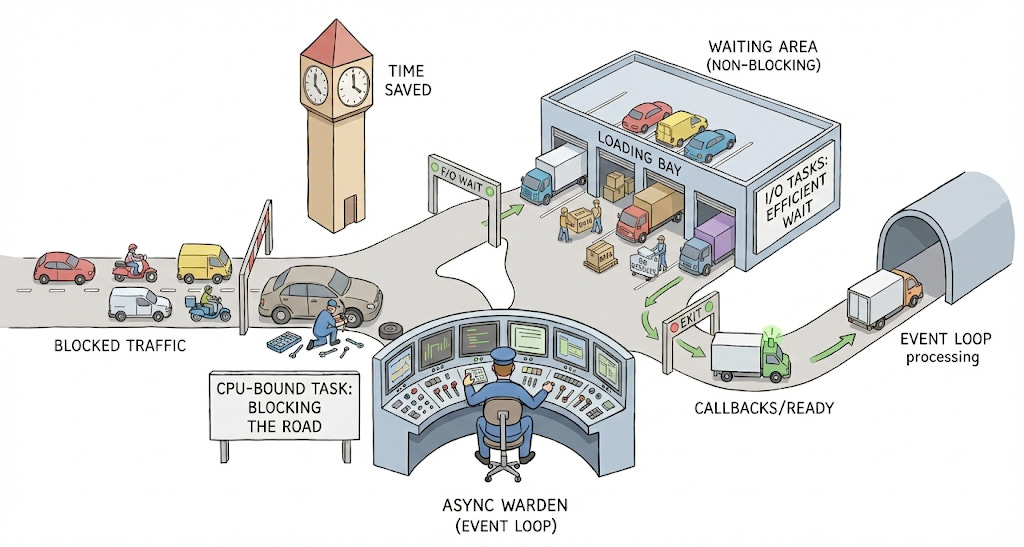
Imagine you’ve designed a state-of-the-art RAG chatbot. Your GPT model answers questions in seconds. Your vector search retrieves context in 150ms. You deploy it to production with FastAPI, expecting to handle concurrent users. But under load, response times balloon to 30+ seconds. Users complain. Your monitoring dashboard shows the server is barely using 10% CPU. What went wrong?
In data science, we optimize for model performance—inference latency, GPU utilization, and memory footprint. But when we deploy these models as web services, we encounter a different optimization problem: concurrency. The distinction between concurrent execution and parallel computation becomes critical, yet many engineers (my younger-self included) stumble into this blindly.
This guide walks through the core concepts, common pitfalls, and production patterns for building truly scalable AI chatbots. It builds on my previous essay on production patterns in python backends. This one is more focused on how to use those concepts in AI chatbots.
TL;DR:
Don’t await everything
Use BackgroundTasks for non-essential tasks
Know your CPU tasks and offload to thread pools
Know your async libraries (spoiler: python ‘requests’ lib is not in this list)
A Primer on Parallelism in Computing
Before we dive deep, let’s just clarify two concepts:
1. True Parallelism aka Multiprocessing
Think of a process as a separate program running on your computer. Each process has its own memory and resources.
What multiprocessing means: Doing multiple things at the exact same instant on different CPU cores.
How it works: Python spawns completely separate processes, each with its own memory and CPU core. On the downside, they can’t easily share data. We need external systems like Redis or databases.
Best for: CPU-bound operations—model inference (PyTorch/TensorFlow), feature engineering, matrix operations, embedding generation.
Key insight: This bypasses Python’s Global Interpreter Lock (GIL), allowing true parallel execution. But spawning processes is expensive and coordination is complex.
2. Smart Concurrency (Event Loop - Asyncio way)
This is the go-to method for I/O-bound tasks in Python.
What it means: Dealing with multiple things at once by intelligently switching between them on a single thread. [Think of thread as a smaller unit of work inside a process]
How it works: Python’s event loop keeps a queue of tasks. When a task hits a waiting point (database query, HTTP request, file read), the loop immediately switches to another task. This switching is cooperative—tasks voluntarily yield control.
Best for: I/O-bound operations where you spend most time waiting—API calls to OpenAI, database reads, vector store queries, Redis cache lookups.
Key insight: Hundreds of tasks can run concurrently on a single thread because switching is extremely lightweight (managed by Python, not the OS). But if one task does heavy computation without yielding, everything freezes. This is what we need to avoid carefully.
Why does this distinction matter?
Asyncio is your primary tool for chatbots. Most chatbot operations like calling OpenAI’s API, querying vector databases, fetching user context from Postgres are I/O-bound. You’re waiting for network responses, not crunching numbers. However, some operations like generating embeddings locally or preprocessing documents are CPU-bound, requiring multiprocessing. Understanding which category your operation falls into determines which concurrency pattern to use.
There is a third option—Multithreading which allows for concurrent execution of code by switching tasks by the OS. This is computationally expensive and is not a preferred method here.
Case Study: Building a Production RAG Chatbot
Coming back to our topic, let’s build a chatbot that retrieves documents from a vector store and generates answers using an LLM. We’ll start with the naive approach, identify bottlenecks, then refactor to production patterns.
The Requirements
Accept user queries
Fetch user context from a database
Retrieve relevant documents from a vector store
Generate response using a GPT model (LLM)
Log conversation to database
Anti-Pattern #1
Below, you’ll see a “naive” implementation that looks fine for a demo but fails under real-world load.
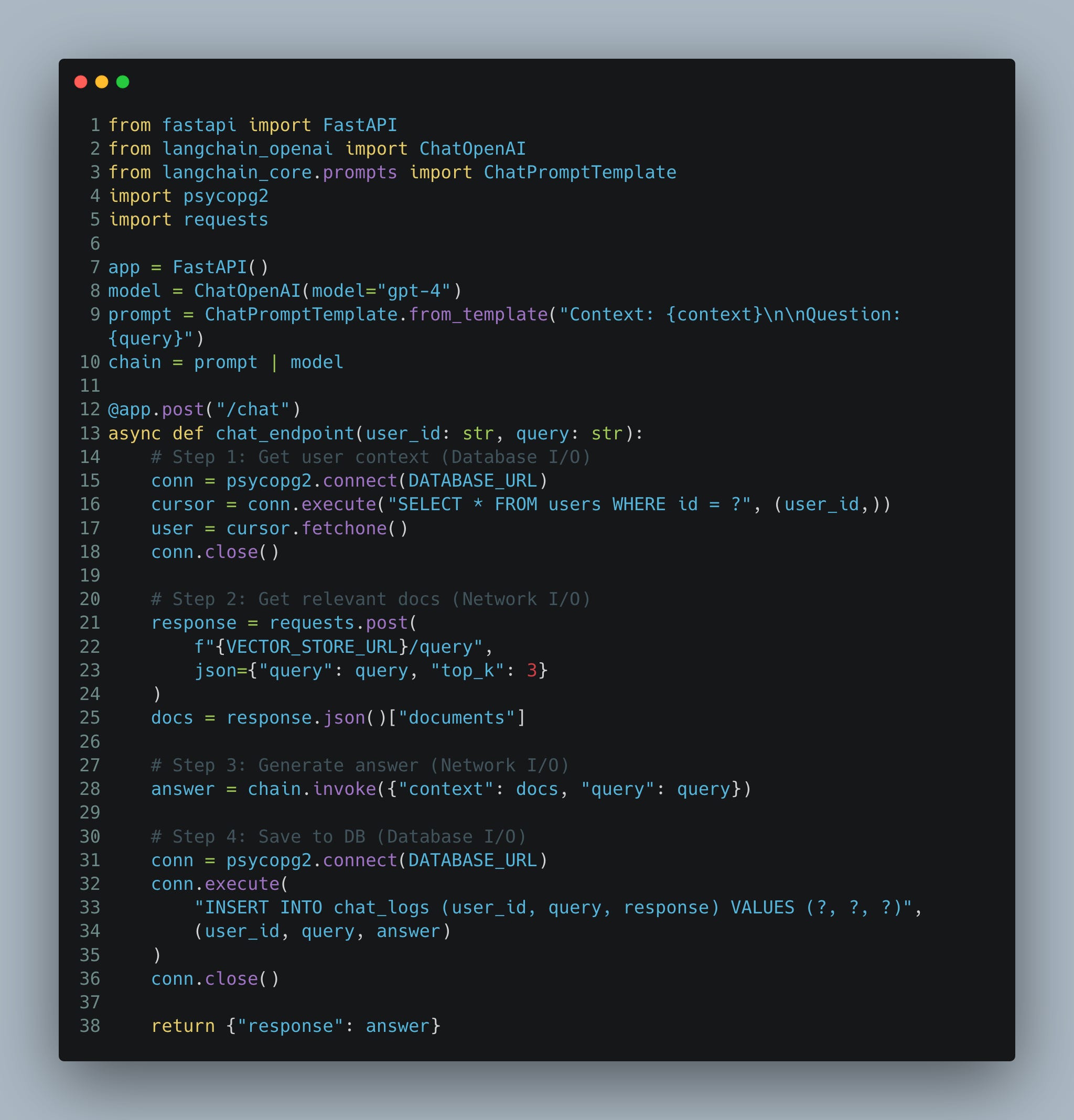
What’s Wrong Here?
The function is
async defbut nothing inside is asynchronous. All operations are blocking.psycopg2.connect()blocks the entire event loop while waiting for the database.requests.post()blocks while waiting for the vector store HTTP response.chain.invoke()blocks while waiting for OpenAI’s API.User waits for logging even though they don’t need to see that result.
The reality: Despite the
async def, this endpoint handles requests sequentially. If 10 users hit it simultaneously, the last user waits for all 9 previous requests to complete.
A Note on HTTP vs WebSockets
You might notice this guide uses HTTP POST endpoints rather than WebSockets. This is intentional and practical for many production chatbots:
HTTP endpoints work well for stateless Q&A systems (search, documentation bots) and are simple to implement. Websockets are better suited for real-time, multi-turn conversations and token by token streaming.
The patterns in this guide apply equally to both approaches—the main difference is WebSockets require additional connection lifecycle management which I shall cover in a future essay.
Let’s fix this step by step!
Fix #1: Use Async-Native Libraries
Not all libraries are created equal. Replace blocking libraries with async equivalents:
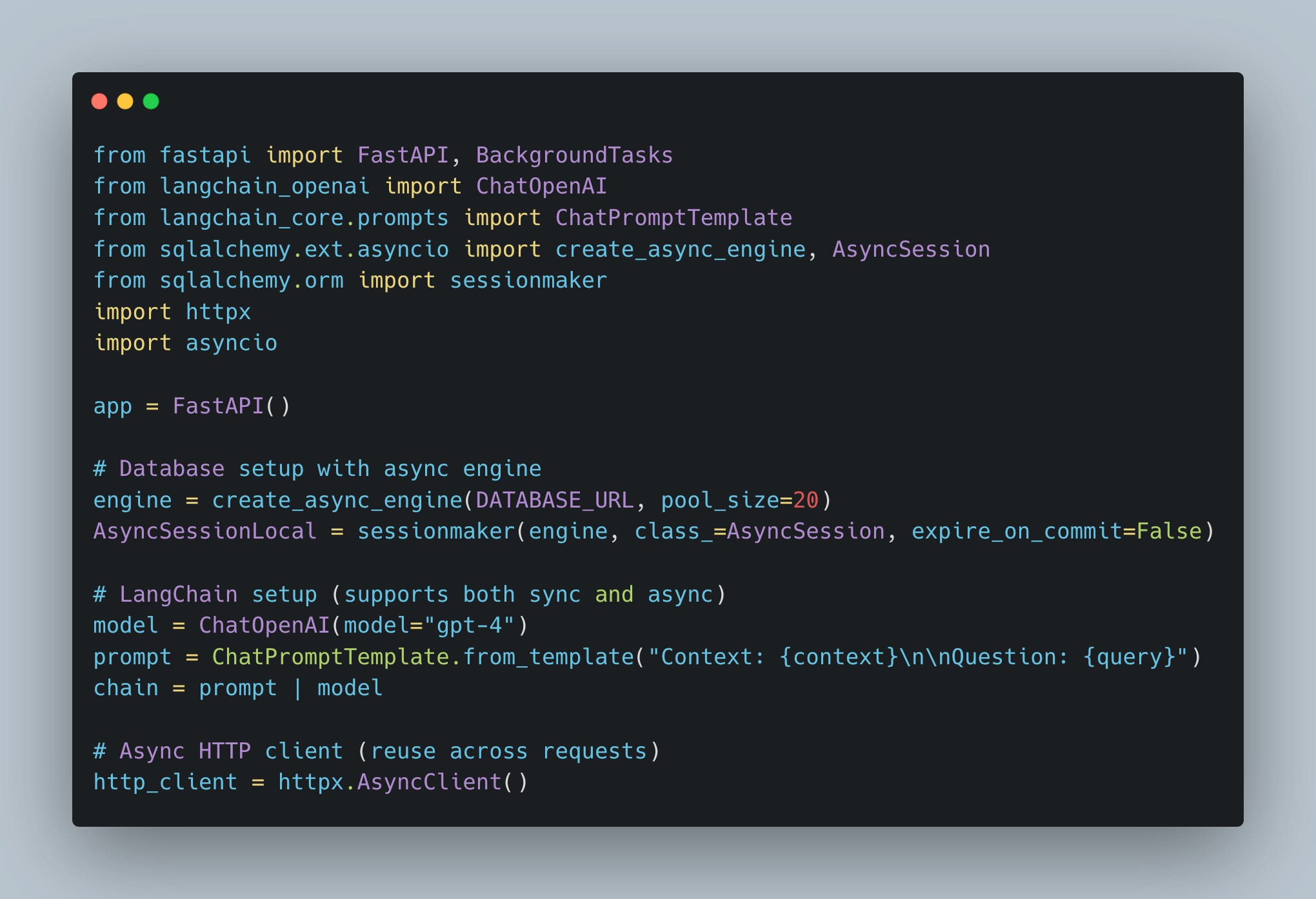
What we did here:
Used an async database session to avoid blocking I/O (you can read more on this setup here).
Switched to an async HTTP client to instead of
requeststo avoid blocking the event loop.
Fix #2: Use await for Critical Path Operations, but avoid for Non-Critical paths
Now we need to determine what an individual user needs to wait for. Not everything requires blocking the response.
Critical path (user waits):
Database query for user profile → User expects personalized response
Vector store lookup → User expects relevant context
LLM generation → User expects the answer
Non-critical path (user doesn’t wait):
Logging the conversation to database → User doesn’t see this, it’s for analytics/audit
If we await the logging operation, we’re adding latency for something the user never sees. Instead, we use FastAPI’s BackgroundTasks.
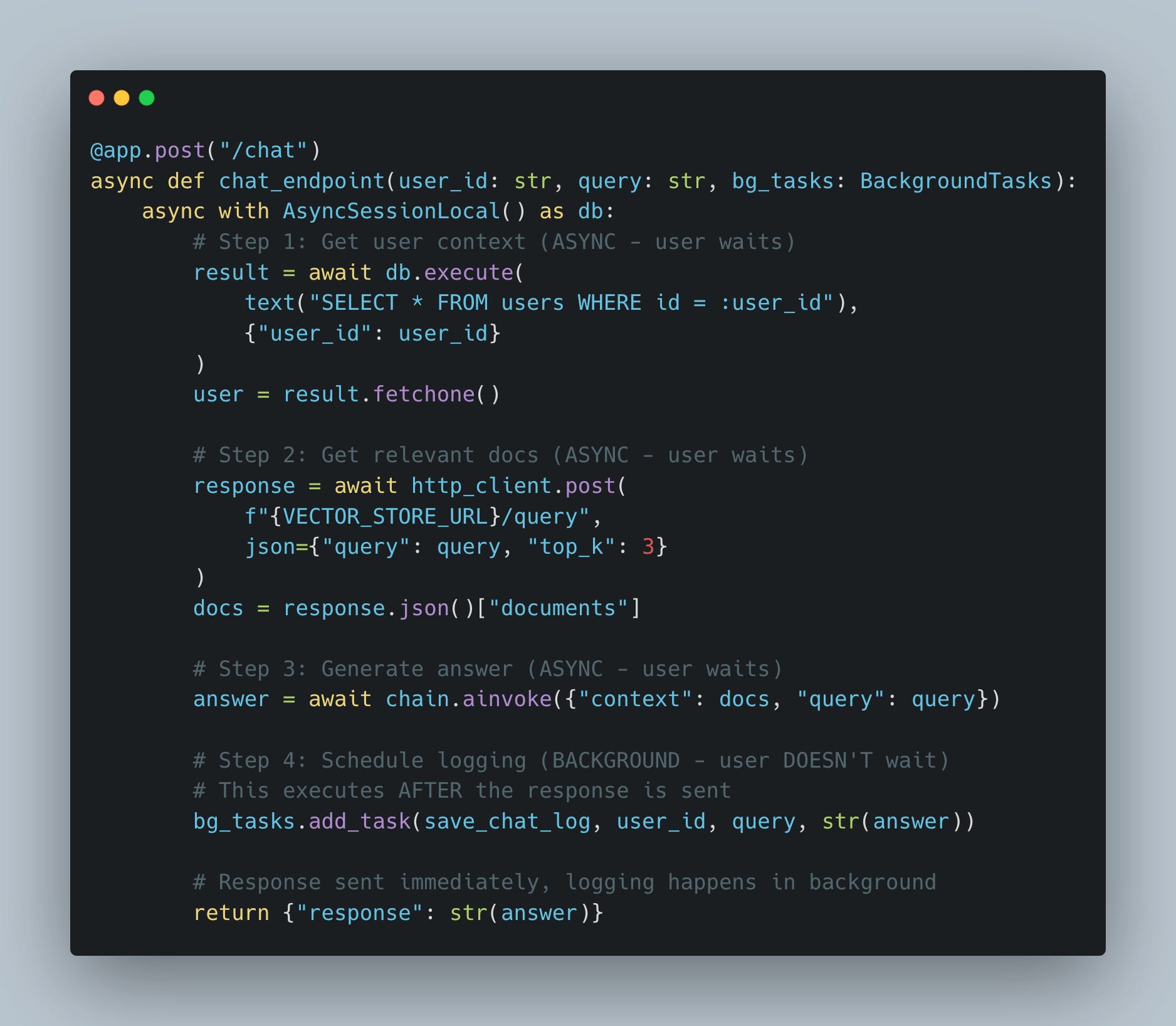
What we did here:
await db.execute()instead of blockingpsycopg2await http_client.post()instead of blockingrequestsawait chain.ainvoke()instead of blockingchain.invoke()bg_tasks.add_task()instead ofawait save_to_db()— saves 50-200ms per request
How BackgroundTasks works:
User gets response immediately (Steps 1-3 complete)
FastAPI holds the connection open briefly
save_chat_logruns after the response is sentConnection closes regardless of logging success/failure
Note
save_chat_logis defined as a regular async function.
Fix #3: Even better, use parallel I/O with asyncio.gather()
Further, steps 1 and 2 (fetching user context and vector search) are independent, so we can fetch them in parallel:
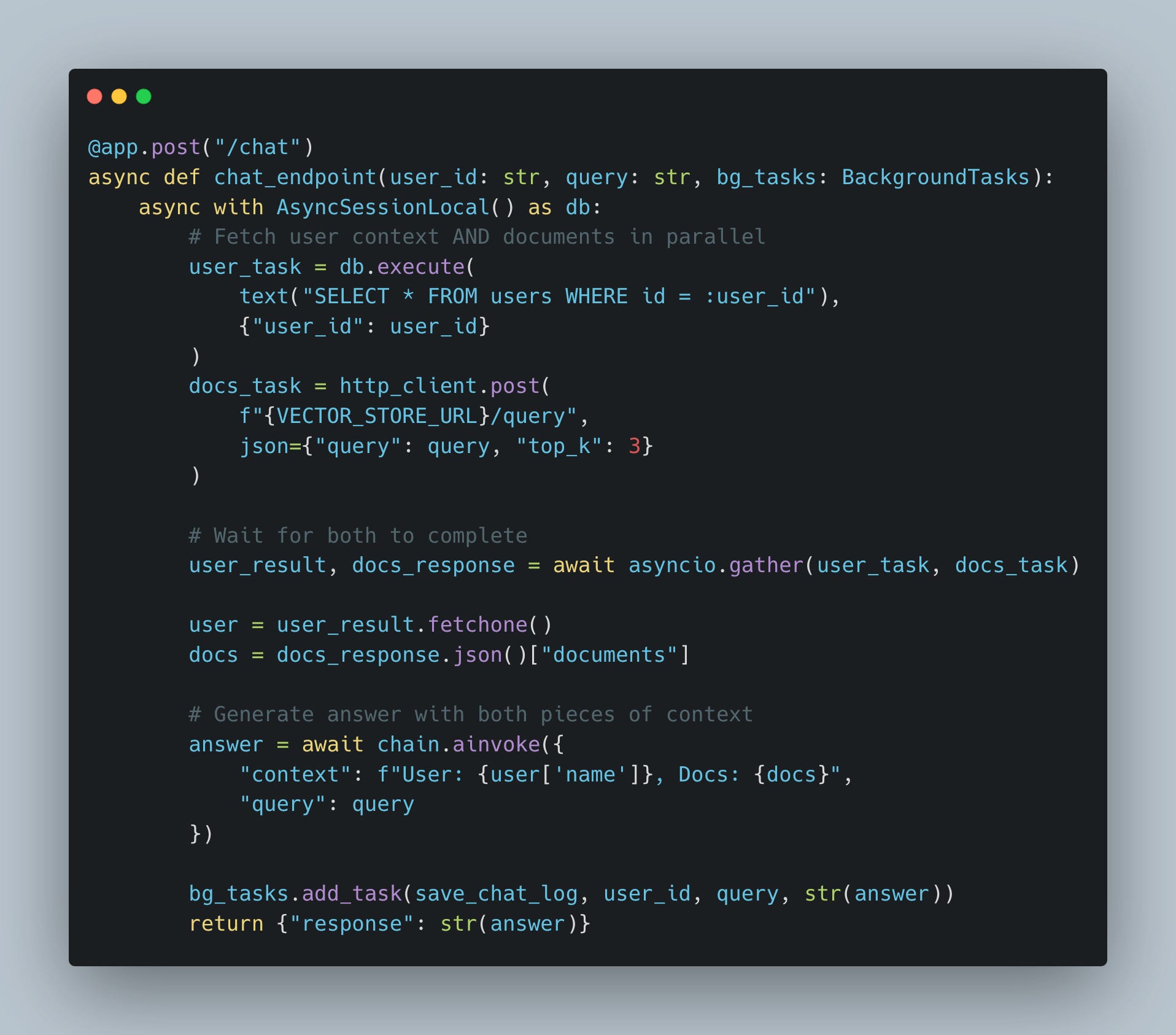
Performance impact:
Sequential: (DB time) + (Vector time) = 200ms + 150ms = 350ms
Parallel: max(DB time, Vector time) = max(200ms, 150ms) = 200ms
This pattern was discussed in detail in my previous article.
Anti-Pattern #2: Blocking the Loop with CPU bound task
Even with async I/O fixed, CPU-bound operations still block:
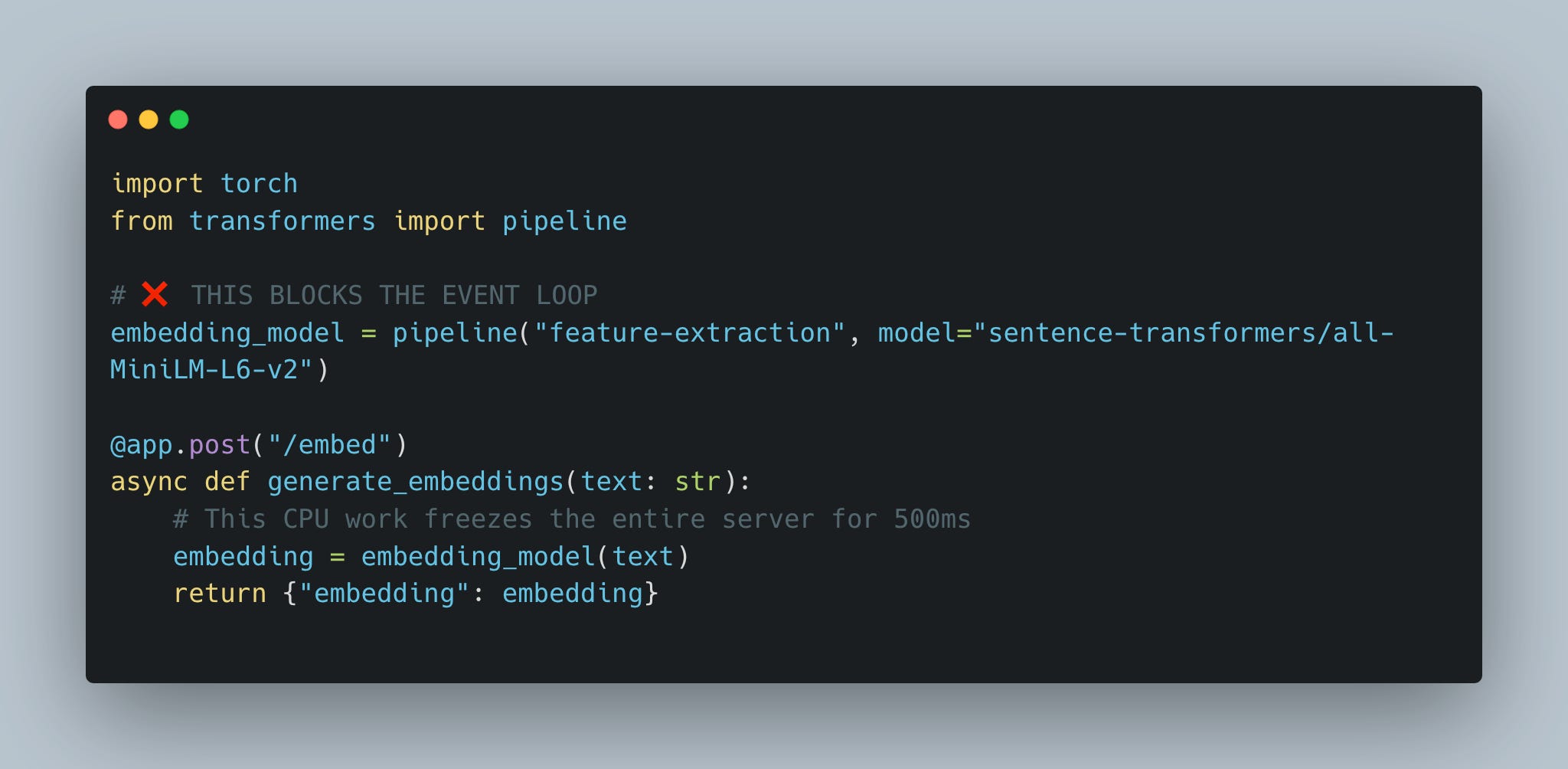
The problem: Model inference is pure computation—no waiting, just CPU work. While this runs, the event loop can’t switch to other tasks.
The Fix: Offload to Thread Pool
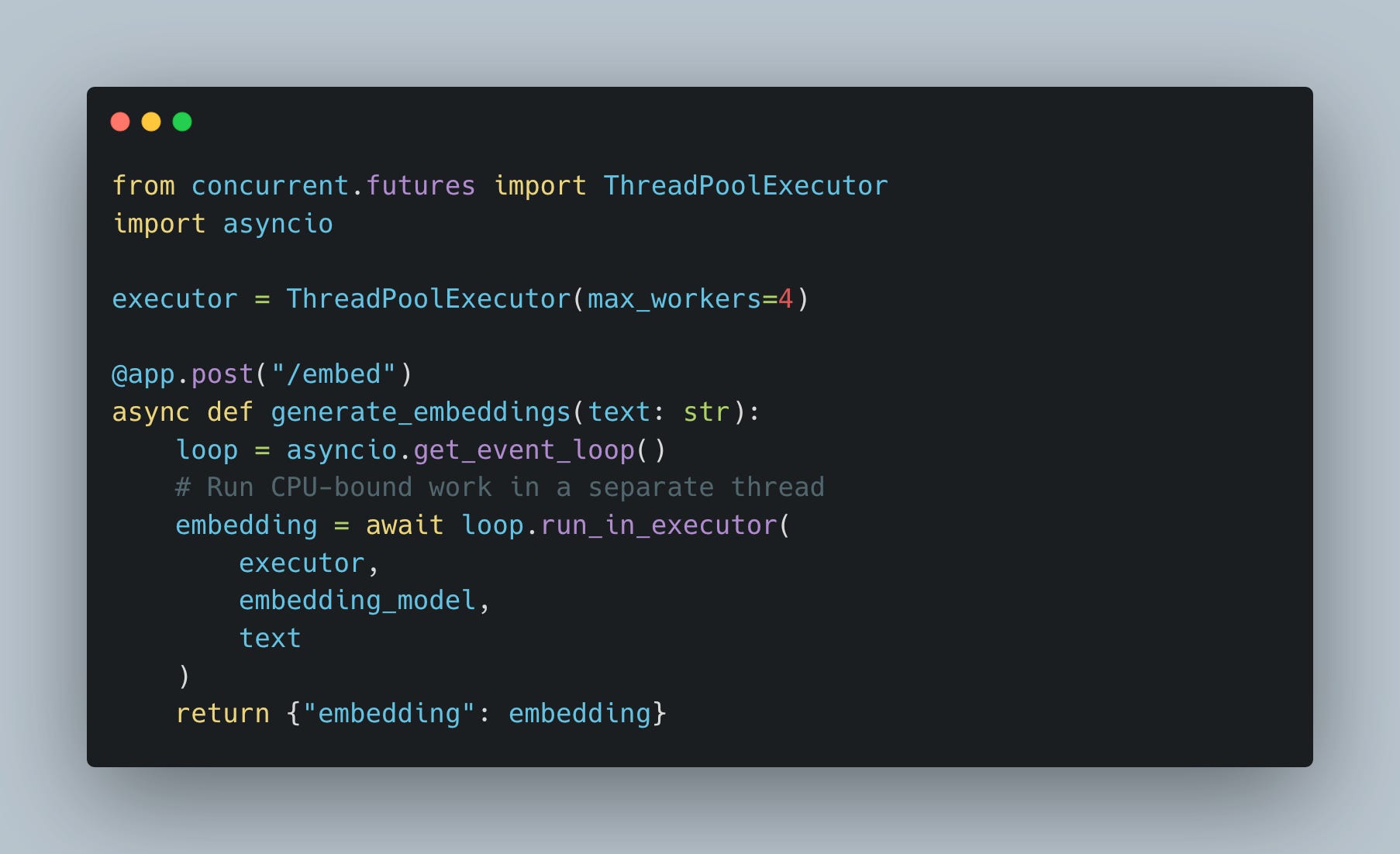
Why this works: The thread pool handles CPU work while the event loop stays free to process other requests.
Anti-Pattern #3: Unmanaged Background Tasks
FastAPI’s BackgroundTasks works great for simple side effects (logging chat to db as we did above), but has limitations for critical operations:
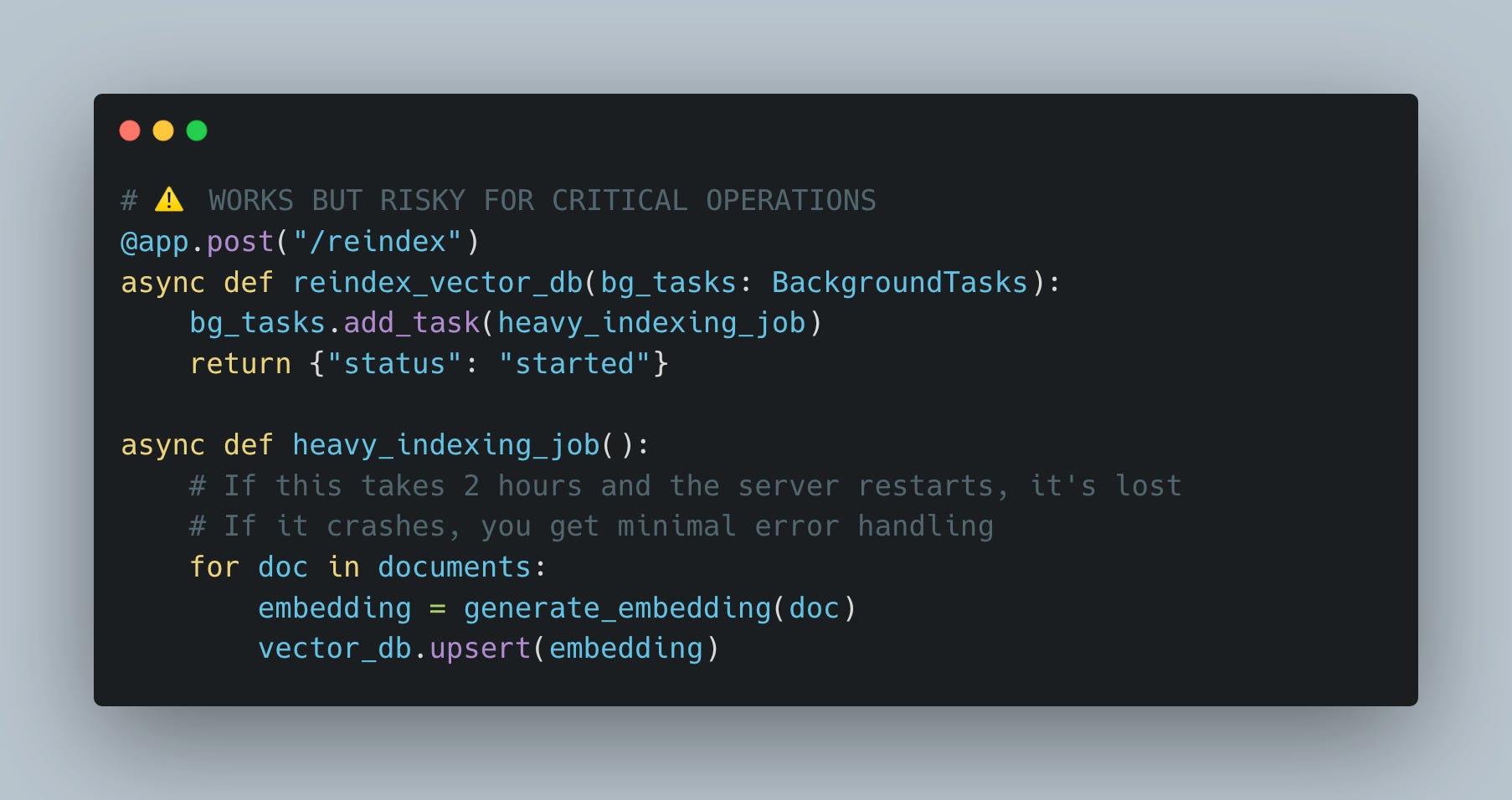
What’s Wrong Here?
No persistence: If the server restarts mid-task, progress is lost
Limited observability: Hard to track progress or retry failures
No rate limiting: Can’t control concurrent reindex operations
The Fix: Queue Worker Pattern
For mission-critical background work (reindexing, batch processing, model training), use a queue:
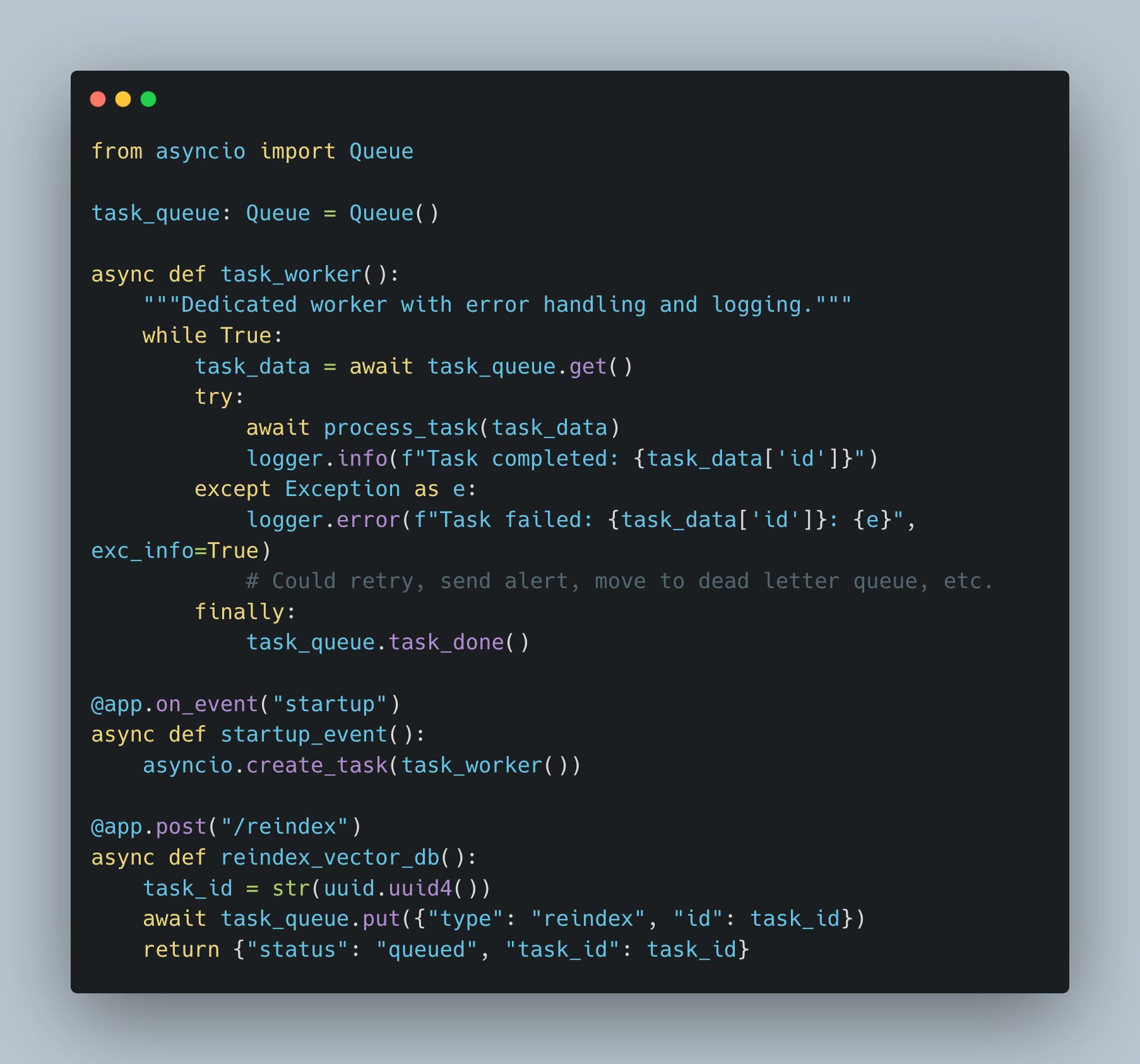
What we did here:
Exceptions are caught and logged
Queue prevents database overload (controlled concurrency)
Note: You might be tempted to use asyncio.create_task() instead of BackgroundTasks for fire-and-forget operations. Avoid this in HTTP endpoints—tasks created this way have no lifecycle management and can be garbage collected mid-execution. This is especially problematic in WebSocket connections where you need explicit cancellation control. For HTTP endpoints, stick with BackgroundTasks; for WebSockets or startup tasks that need cancellation, use create_task() with proper reference tracking. For mission-critical background work (reindexing e.g.), use a queue.
LangChain & OpenAI SDK: Mind the difference
When building production chatbots, you’ll inevitably work with LangChain (for RAG pipelines, agent frameworks, and chain orchestration) or the OpenAI SDK directly. These are the two most common libraries in production AI systems, yet they handle async operations differently.
LangChain: Dual Interface Pattern
LangChain’s components (chains, models, retrievers) support both sync and async:
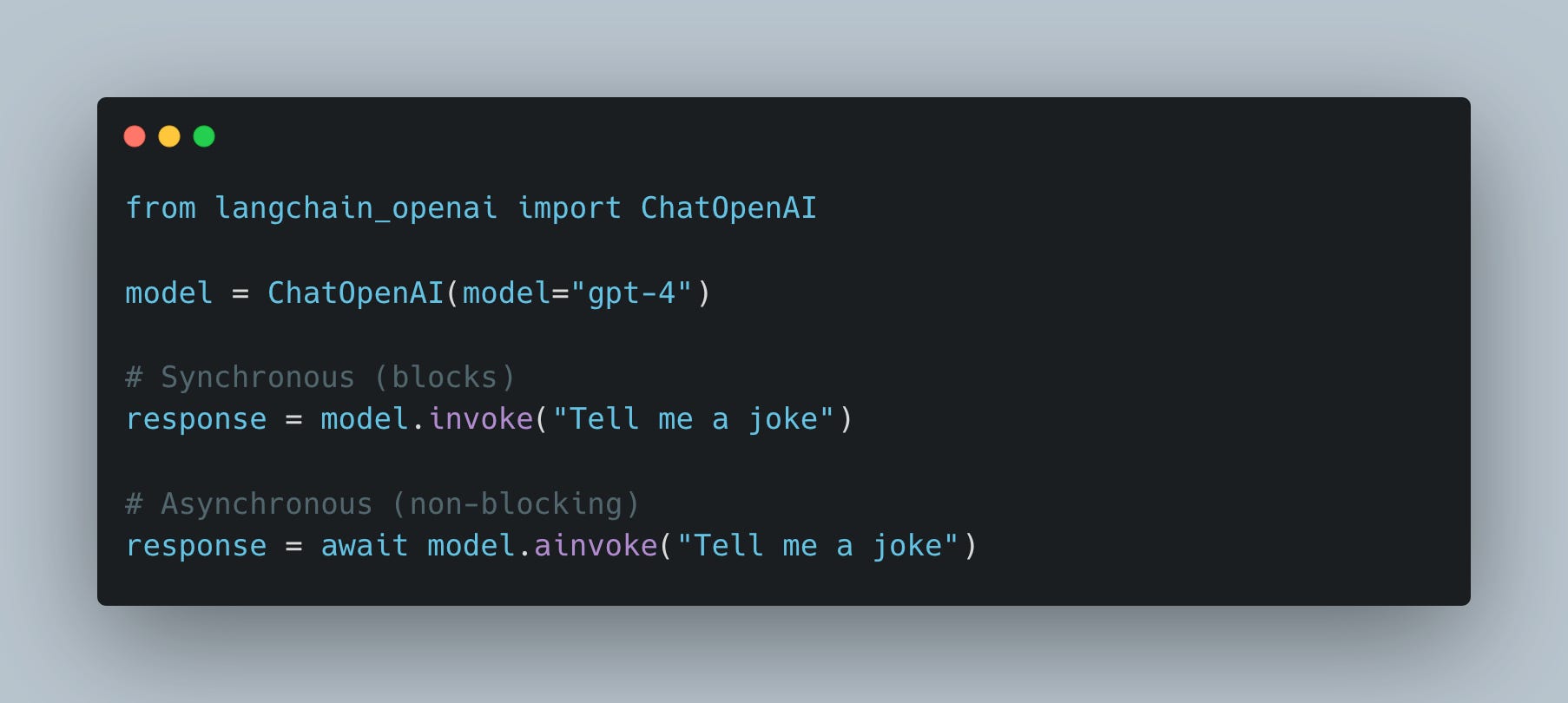
Critical rule: In FastAPI async def routes, always use ainvoke, never invoke.
OpenAI SDK: Separate Clients
The OpenAI Python SDK requires different client classes:
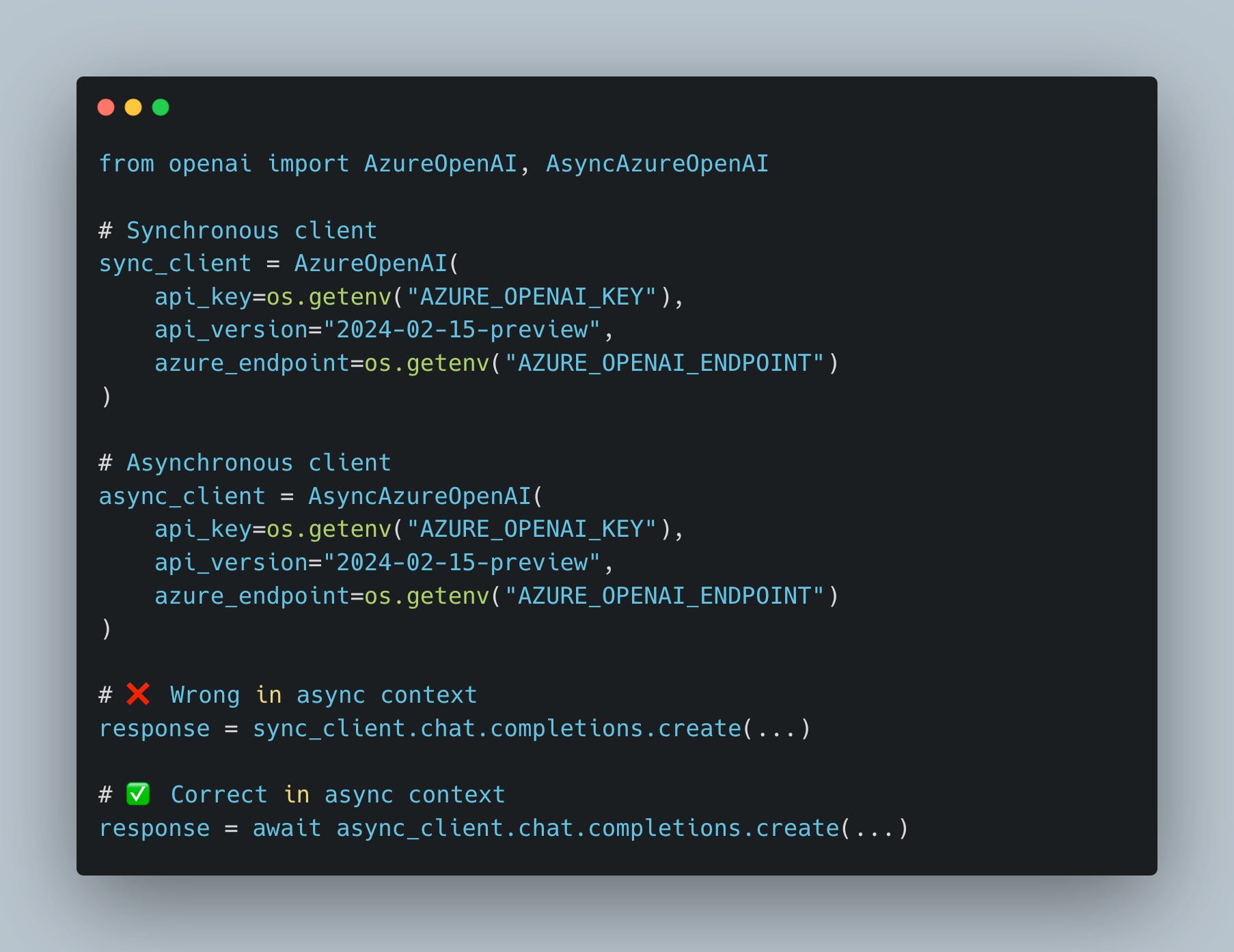
Note: LangChain’s ChatOpenAI handles this internally—you just switch between invoke and ainvoke.
My Complete Production Template
Key Takeaways
Use
ainvoke, notinvokefor all LangChain operations in async routesReplace blocking libraries with async equivalents (e.g.,
httpxinstead ofrequests,asyncpginstead ofpsycopg2,SQLAlchemy Asyncinstead of sync ORM)Offload CPU work to thread pools with
loop.run_in_executor()Use
asyncio.gather()for parallel I/O operationsUse
BackgroundTasksfor side effects users don’t need to seeUse queue workers for critical background jobs that need monitoring
For deeper debugging patterns including correlation IDs and structured logging, see my previous article on production Python backends.
Author is an AI specialist focused on scalable, production systems AI systems. LinkedIn.